Quick Answer: Yes, you can keep Aadhaar and PAN card photos on your phone. You must take precautions. Use a screen lock, do not save copies of Aadhaar and PAN card photos in different folders, and share documents only with verified recipients. A PIN‑protected document storage app such as Docu Wallet can help keep these files organised and give you access when needed.
Imagine you have just received a job offer. The HR team asks you to submit Aadhaar and PAN card copies to finish the onboarding process. You open your phone gallery. Finding the correct Aadhaar and PAN card photos takes time. You have screenshots, duplicate Aadhaar and PAN card photos, and documents saved in different folders.
A similar situation can happen in a family. One person may keep Aadhaar cards, PAN cards, and other important documents for parents, spouse, and children on a phone. Without a system, it becomes hard to find the right Aadhaar or PAN card when needed.
These situations show why keeping copies of important documents can be useful, but storing them without care can create problems. So, is it safe to keep Aadhaar and PAN card photos on your phone? Let us understand the risks and the precautions you can take.
Is It Safe to Keep Aadhaar and PAN Card Photos on Your Phone?
Yes, you can keep Aadhaar and PAN card photos on your phone provided you take precautions. The main concern is not simply having a copy. The concern is how easily someone else could access, copy, or share Aadhaar or PAN card photos.
For example, think about these situations:
- You lose your phone, and someone gains access to your gallery.
- You share an Aadhaar photo with a contact.
- You upload Aadhaar or PAN card photos to a website or app.
- You keep copies of Aadhaar and PAN card photos across different folders.
- You use a shared device where others can open your Aadhaar and PAN card files.
Your Aadhaar and PAN cards contain details that should not be shared unnecessarily. UIDAI also advises Aadhaar holders not to share Aadhaar on public platforms.
This does not mean you should never use copies. It means you should know where Aadhaar and PAN card files are stored and who can access them.
What Can Go Wrong If You Store ID Photos Without Care?
A photo of an identity card may look like an image, but it contains information that can be misused if it reaches the wrong person.
Here are some common risks to understand.
1. Someone May Access Your Phone
If your phone is lost, stolen, or left unlocked, another person may open your gallery and view saved Aadhaar and PAN card photos.
This can expose Aadhaar number, PAN details, photograph, name, and other personal information.
Always use a screen lock, such as a PIN, password, or pattern. Do not share phone unlock details with others.
2. You May Share Documents With the Wrong Person
People often send Aadhaar and PAN card photos through messaging apps, email, or other sharing platforms. This can be necessary for applications and verification.
However, sending a document to the contact or an unverified person can expose Aadhaar and PAN card details.
Before sending any ID document, check the recipient. Confirm why they need it. Do not send Aadhaar or PAN card photos to numbers or email addresses.
3. Multiple Copies Can Be Hard to Track
You may save one Aadhaar photo in your gallery, another in your downloads folder, and a third in a messaging app.
Over time, it becomes difficult to know which copy is current or where each file is stored. You may also forget about copies that are no longer needed.
A document organizer can help keep files in a dedicated place instead of searching through different folders.
4. Unfamiliar Apps and Websites May Put Your Information at Risk
Some apps ask for access to photos, files, contacts, or other phone information. Not every app needs access to Aadhaar or PAN card photos.
Be careful when uploading Aadhaar or PAN card photos to websites and apps you do not recognise. Check the app developer, permissions, and purpose before sharing files.
7 Ways to Protect Aadhaar and PAN Photos on Your Phone
You can manage Aadhaar and PAN card photos more carefully by following a few simple habits.
1. Use a Screen Lock on Your Phone
Keep your phone protected with a PIN, password, or pattern that others cannot easily guess. Avoid simple combinations such as 1234 or your birth year. Do not share your unlock PIN with others.
2. Avoid Keeping ID Photos in Your Gallery
Your gallery contains everyday photos, screenshots, and downloads. Keep important identity documents in a dedicated place instead. A document organizer app can help you store and find these files easily.
3. Use Masked Aadhaar When a Full Number Is Not Needed
Masked Aadhaar hides the first eight digits and displays only the last four. Use it when the organisation accepts this version. You can download it from the official UIDAI website.
4. Share Documents Only With Verified Recipients
Before sharing Aadhaar or PAN photos, check who is requesting them and why. Avoid sending identity documents to unknown contacts or posting them on social media and public platforms. Use official submission channels whenever possible.
5. Check Your Cloud Backup Settings
Cloud backups can help you access files when changing or losing your phone. Check which Google account stores your documents and who can access it. Avoid using shared accounts for personal identity files.
6. Keep Your Phone and Apps Updated
Install phone and app updates from official sources. Review app permissions regularly and limit access to photos and files when an app does not need it.
7. Remove Unnecessary Copies
Review your downloads, screenshots, and messaging apps for duplicate identity documents. Delete copies you no longer need, but make sure you keep the files required for future use.
Should You Use a Documents App for Aadhaar and PAN Cards?
A documents app can make it easier to manage identity cards and other important files on your phone. Instead of keeping every document in your gallery, use a dedicated document storage app to add, view, search, and share files from one place. This can help people.
For job seekers: Keep Aadhaar, PAN, education certificates, experience letters, and other application documents easy to access during recruitment.
For working professionals: Store frequently requested documents so you do not have to search emails or phone folders when an organisation asks for a copy.
For people who manage family documents: Keep track of documents belonging to family members, such as Aadhaar cards, PAN cards, and other important records.
When choosing a document organizer app, look at how it handles file storage, app access, backups, and document sharing. Read the app’s privacy information. Understand where your files are kept before adding sensitive documents.
How Docu Wallet Helps You Manage Important Documents
Docu Wallet is a document storage app for Android that gives you a dedicated place to keep important documents on your phone. You can add documents from your camera, gallery, or phone storage. Give each file a name and a short description so you can find it later.
Here are the steps:
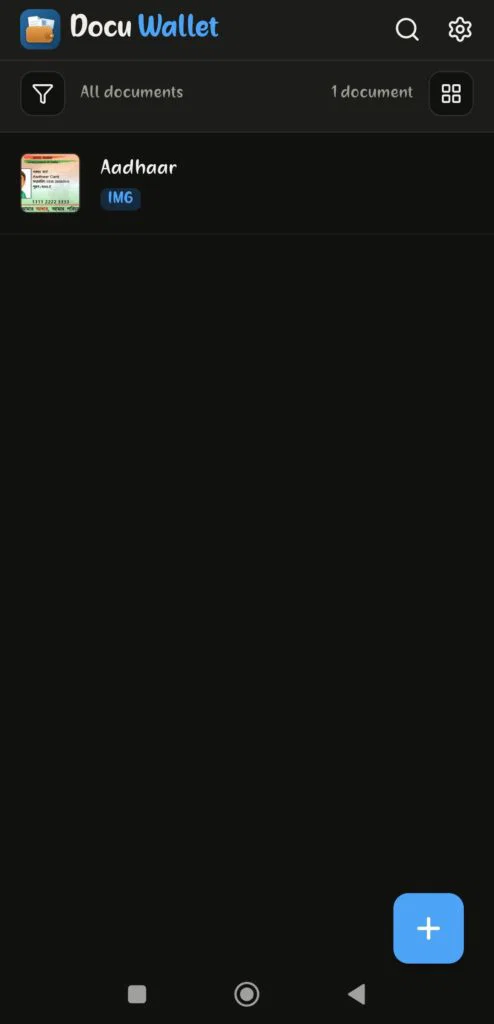
- The home screen displays your document library, where you can view and manage saved files. Tap the + button to add your first document.
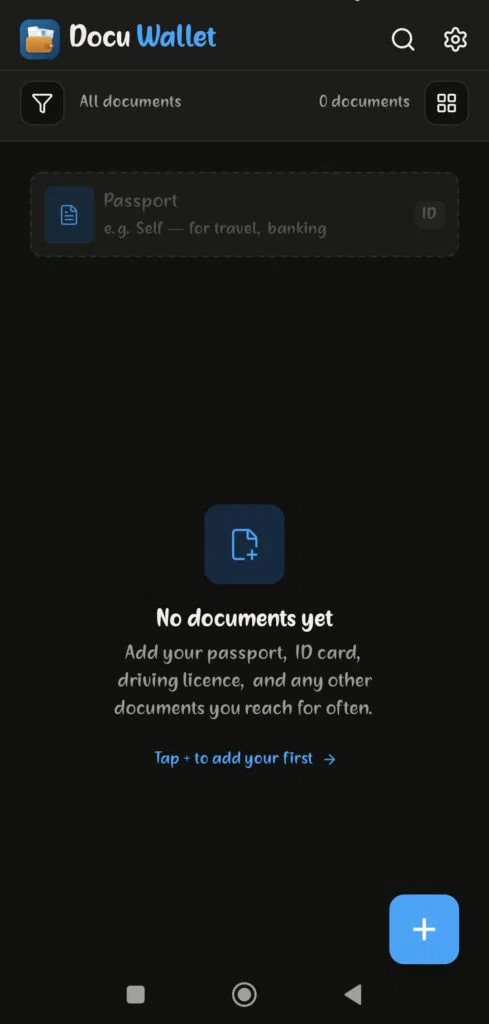
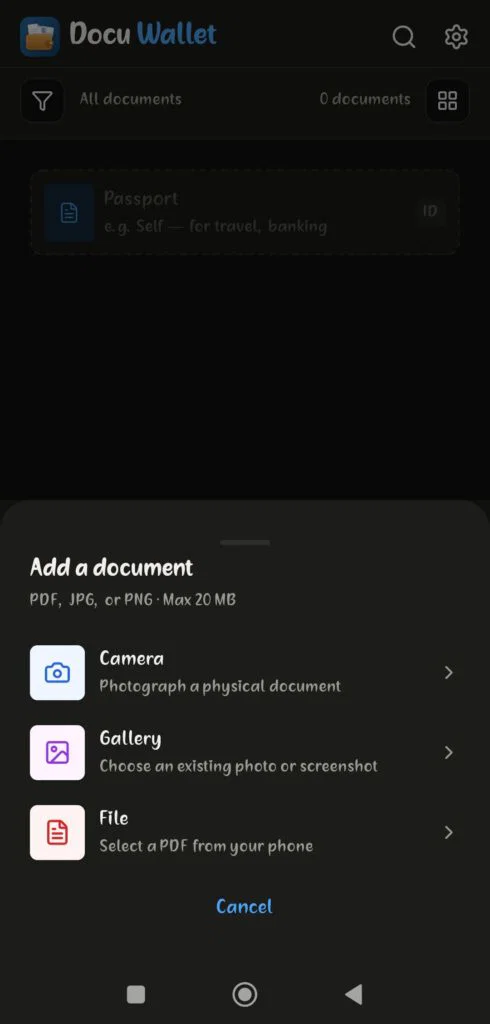
2. Choose how you want to add a document: use your camera, select an existing photo from your gallery, or upload a PDF from your phone.
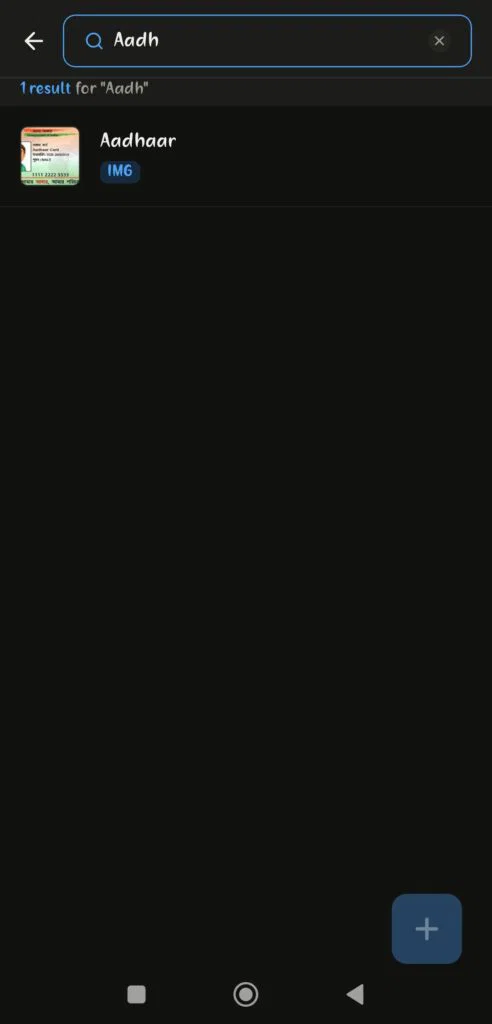
3. Enter a document name or a related keyword in the search bar to find the file you need. Docu Wallet displays matching results, making document access quicker.
4.Your Aadhaar document appears in the document library after you add it. You can find it whenever needed without searching through your phone’s gallery.
Other Useful Docu Wallet Features
The app also offers these features:
- PIN-protected access: Open the app using your PIN.
- Offline access: Add, view, and search saved documents without an internet connection.
- Google Drive sync: Sync your documents with your own Google Drive account.
- Document viewing: Open saved images and PDFs inside the app.
- Easy sharing: Share documents using your phone’s built-in sharing options whenever needed.
Docu Wallet stores documents locally on your device and syncs them with your own Google Drive. It does not store your documents on Docu Wallet’s servers.
Remember that using a document storage app does not replace good safety habits. Keep your phone’s screen locked, use a PIN that you do not share, and send documents only to verified recipients.
Download Docu Wallet on Google Play and keep your important documents organised in one place.

Final Thoughts
Keeping Aadhaar and PAN photos on my phone saves time, especially when I need to submit documents for jobs, banking, or everyday verification. Convenience should not replace careful sharing or good file management.
I use a screen lock, avoid sharing, check where my files are backed up, and delete copies I no longer need. A document organizer app also helps me keep files in one place and find them when I need them.
With simple habits, I can make everyday document management easier while better protecting my personal information.
Frequently Asked Questions
1. Is it safe to keep a PAN card photo in my phone gallery?
You can keep a PAN card photo on your phone, but your regular gallery may not be the best place for important identity documents. Use a screen lock and consider a dedicated document organizer app for easier management.
2. Should I send my Aadhaar card photo on WhatsApp?
Only send it when there is a genuine need, and you have verified the recipient. Avoid sending Aadhaar details to unknown contacts or sharing them in groups. Check whether the recipient accepts a Masked Aadhaar copy.
3. What is a Masked Aadhaar card?
A Masked Aadhaar is an Aadhaar copy where the first eight digits of the Aadhaar number are hidden. Only the last four digits remain visible. UIDAI provides this option for people who do not need to display their full Aadhaar number.
4. Can I access my documents without an internet connection?
This depends on the app you use. Docu Wallet allows you to add, view, and search documents offline. Google Drive sync requires an internet connection.
5. What should I do if my phone is lost?
Use the phone’s official device-finding service to locate, lock, or erase it if available. Change the passwords for important accounts if you think someone may access them. If you suspect Aadhaar-related misuse, review the available UIDAI services and contact UIDAI for guidance.