Quick Answer: You should keep digital copies of important documents such as your Aadhaar card, PAN card, passport, driving licence, voter ID, educational certificates, employment records, bank documents, insurance policies, and rental or property papers. These copies can help you access important information quickly during job applications, KYC verification, travel, banking, and family-related requirements. A document storage app like Docu Wallet can help you keep frequently used personal documents organised and easy to find.
Picture yourself at a job interview and the HR team asks for your PAN card. Picture yourself at a bank and need your address proof. You open your phone. The document is hidden among old photos, downloads and WhatsApp messages.
These situations happen often. We need documents for job applications, KYC verification, travel, banking, insurance and everyday family needs. Keeping copies makes them easier to reach when you need them.
Whether you are a job seeker, a working professional, or someone who manages family documents, having digital copies of essential records can save you time.
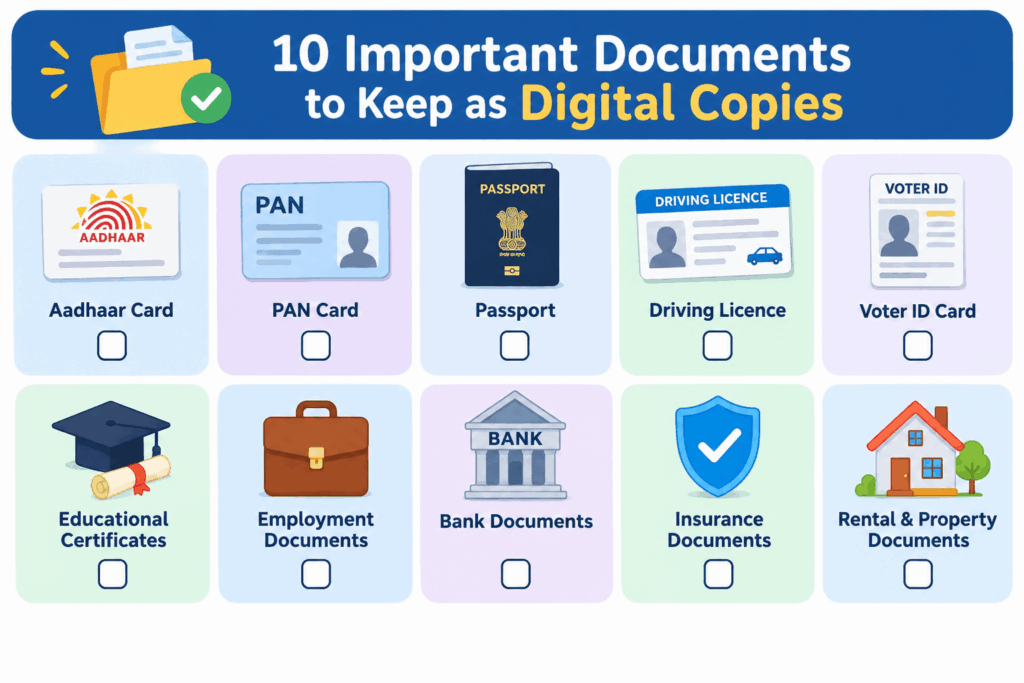
Here are 10 important documents you should consider keeping as digital copies.
1. Aadhaar Card
Aadhaar is often needed for identity and address verification in India. You may need it for banking services, government processes, mobile connections or other official needs.
Keep a digital copy of your Aadhaar card, including both sides if you have a physical card. You can also download your Aadhaar from the UIDAI website.
Why keep a copy?
- Access your details when completing forms.
- Share a copy when an organisation requests it.
- Avoid searching through files whenever you need it.
Remember to check whether the organisation accepts a copy or requires another form of Aadhaar verification.
2. PAN Card
Your PAN card is important for income tax work, banking, financial transactions and KYC verification.
Job seekers may need it during employee onboarding. Working professionals may need it for tax processes, while family members may need it for banking or financial paperwork.
Why keep a copy?
- Find your PAN details when completing financial forms.
- Share the document when required for KYC.
- Keep it available without carrying the card everywhere.
Make sure the name and other details on your copy are readable.
3. Passport
A passport is an identity and travel document. You may need its details when booking travel, applying for a visa, filling travel forms or verifying your identity.
Even if you don’t travel often, keeping a copy can still be useful.
Why keep a copy?
- Refer to your passport number and expiry date.
- Access your details while completing visa applications.
- Keep a copy when planning international trips.
Save a copy of the pages with your photograph and personal details. Remember that a digital copy does not replace your passport during international travel.
4. Driving Licence
A driving licence is a document for anyone who drives a two‑wheeler or four‑wheeler. You may need it during traffic checks, vehicle processes or when renting a vehicle.
Why keep a copy?
- Refer to your licence details and validity.
- Access a copy when completing vehicle‑related forms.
- Keep the document available when travelling.
You can also use government‑supported document services where accepted. Check the requirements before relying on a stored image or PDF.
5. Voter ID Card
Your Voter ID is an identity document used for elections. It may also be requested as identity or address proof in some situations depending on the organisation’s needs.
Why keep a copy?
- Keep your voter details available for reference.
- Access your information when completing forms.
- Avoid searching through document folders.
Check that the details on your saved copy are clear and up to date.
6. Educational Certificates and Mark Sheets
Educational documents are especially important for students and job seekers. You may need school certificates, degree certificates, mark sheets, diplomas or professional course certificates when applying for jobs or higher education.
Working professionals may also need these documents for background verification or career opportunities.
Why keep copies?
- Submit documents during job applications.
- Refer to marks, grades and qualification details.
- Keep certificates from institutions together.
- Access academic records when required.
Save each certificate with a name. For example, use names such as “Graduation Certificate” or “Class 12 Mark Sheet” instead of generic file names.
7. Employment and Experience Documents
If you have worked before, keep digital copies of important employment records. These may include experience letters, relieving letters, offer letters, appointment letters and salary documents.
Job seekers may need documents during interviews or onboarding. Working professionals may need documents when changing jobs, applying for loans or completing background verification. I know how important it is to be prepared.
Why keep copies?
- Refer to previous employment details.
- Share experience documents during recruitment.
- Access and appointment details when needed.
- Keep records from employers in one place.
Organise these documents by employer or document type so you can identify the file quickly. I find this method saves me hours of searching.
8. Bank Documents and Card Details
Bank-related documents are often needed for salary processing, account verification, loan applications and other financial activities. Without these documents, I have seen people face delays.
You may want to keep copies of your cancelled cheque, bank passbook details, account-related letters and other documents provided by your bank. I always keep a copy of my passbook.
For debit or credit cards, avoid saving copies of sensitive card information. Never store your PIN, CVV, OTP or passwords with document images.
Why keep bank documents digitally?
- Refer to account details when completing forms.
- Access your bank. Supporting documents.
- Find salary or account-related paperwork when required.
Only keep the information you genuinely need and share bank documents through secure channels.
9. Insurance Documents
Insurance documents can be important during emergencies, hospital visits, claims, renewals and policy-related enquiries. These documents can save you time during emergencies.
These may include health insurance policies, life insurance documents, vehicle insurance papers and policy renewal records.
If you manage documents for your family, keeping copies of each member’s policies can make it easier to find the right information.
Why keep copies?
- Refer to policy numbers and coverage details.
- Check renewal. Policy information.
- Access documents when contacting the insurance provider.
- Find supporting paperwork during a claim.
Keep the policy documents and remove outdated copies when they are no longer needed.
10. Rental Agreements and Property Documents
Rental agreements, property-related records and other housing documents are useful for tenants, homeowners and people managing family paperwork. I have helped families keep track of their leases.
You may need an agreement for address verification, tenant-related communication or other administrative work. Property owners may also need copies of relevant ownership and payment records.
Why keep copies?
- Refer to agreement terms and dates.
- Check rent, deposit and renewal details.
- Access property-related records when required.
- Share pages with verified recipients.
Keep copies of signed agreements and make sure all pages are readable.
How to Keep Your Digital Documents Useful
Saving a copy is only the first step. You should also make sure the files are easy to identify and remain up to date.
Here are a few simple practices:
- Use document names: Avoid names such as IMG_2026 or Document1. Use names like “PAN Card – Self” or “Insurance Policy – Mother.”
- Keep the version: Replace expired or outdated copies when you receive updated documents. Avoid confusing current versions.
- Check document readability: Make sure photographs and scanned PDFs show all the necessary details. Retake images.
- Review your documents periodically: Check expiry dates, policy renewals and changes in personal information.
- Be careful when sharing: Verify the recipient and the purpose before sending identity, banking or family documents. Share only what is required.
- Keep a backup: Understand where documents are stored and how you can access them if you change or lose your phone.
How Docu Wallet Helps You Manage Important Documents
Keeping personal documents on your phone can become confusing when they are mixed with photos, downloads and other files.
Docu Wallet is an Android document storage app designed to give your documents a dedicated searchable place.
You can add documents using your camera, Gallery or phone storage. Give each file a name and a short description to make it easier to find
Some useful features include:
- Search by name or description: Find documents using words such as “PAN,” “Aadhaar,” or “Insurance.”
- PIN-protected access: Enter your PIN whenever you open the app.
- Offline access: Add, view and search saved documents without an internet connection.
- Google Drive sync: Sync documents with your Google Drive account.
- PDF and image viewing: Open saved files in a full-screen viewer.
- Easy sharing: Share documents through WhatsApp, email or other apps using your phone’s native sharing options.
Docu Wallet keeps your documents on your device. Sync them with your Google Drive account. Docu Wallet does not store your document contents on Docu Wallet servers.
Download Docu Wallet from Google Play. Keep your personal documents that you use often easy to find.

Frequently Asked Questions
1. Which documents should I keep as digital copies?
Start with your Aadhaar card, PAN card, passport, driving licence, voter ID, educational certificates, employment records, bank documents, insurance policies, and rental or property agreements.
2. Can I use digital copies instead of original documents?
Not always. Some organisations accept digital copies, while others may ask for original documents, certified copies, or documents from an official digital service. Check the requirements before submitting them.
3. What is the best way to organise digital documents?
Use clear file names, keep the latest versions, and store important files in a place where you can find them easily. A document organiser app can help you manage personal documents separately from everyday photos and downloads.
4. Can I store personal documents in a documents app?
Yes. A documents app such as Docu Wallet lets you add images and PDFs, name each file, and search for it later. Docu Wallet also supports PIN-protected access, offline use, and Google Drive sync.
5. How often should I update my digital documents?
Review them every few months and whenever you receive a new certificate, renew an insurance policy, update an ID, or change important personal details.
6. Can I access my documents without the internet?
Some apps support offline access. In Docu Wallet, documents saved on your device can be added, viewed, and searched without an internet connection. Google Drive sync happens when you are online.