Quick Answer: Your phone Gallery is convenient for viewing ID photos, Google Drive is useful for cloud storage and backups, and Docu Wallet is designed to help you store, find, and share personal documents. The right option depends on how often you use your documents and how you prefer to access them.
Imagine you are applying for a new job. The HR team asks for your PAN card and Aadhaar copy. You open your phone, search through your Gallery, check a few Google Drive folders, and finally find the right files.
Now imagine managing documents for your parents, spouse, and children on the same phone. Finding the correct document can take even longer.
This is why choosing the right place to store digital documents matters. You can use your phone Gallery, Google Drive, or a dedicated document organizer like Docu Wallet. Each option serves a different purpose.
Let’s compare them and understand which one suits your everyday needs.
1. Storing IDs in Your Phone Gallery
Your phone Gallery is often the first place where you save photos of important documents. You can take a picture of your Aadhaar card, save a PAN card image, or download a document and keep it with your other photos.
It is simple and does not require a separate documents app.
Advantages of using Gallery
- Quick access: Open your Gallery to view saved document photos.
- Easy to add: Take a picture or save an image from another app.
- No extra app required: Most smartphones already have a Gallery app.
- Easy sharing: Send an image through your phone’s sharing options.
Limitations of using Gallery
- Documents mix with regular photos: ID images can get buried among screenshots, family pictures, and downloads.
- Finding files takes time: You may need to scroll through several images to find the right document.
- Limited organisation: A regular Gallery is mainly designed for photos and videos, not personal records.
- Backup depends on settings: Your photos may be backed up if you have enabled a cloud photo service.
Gallery works well if you save only a few document photos and do not need to access them often. However, managing several IDs and family documents can become difficult.
2. Storing IDs in Google Drive
Google Drive is a cloud storage service where you can upload documents, photos, PDFs, and other files. You can organise them into folders and access them through your Google account.
For example, you could create folders such as Personal IDs, Work Documents, Bank Records, and Family Documents.
Advantages of using Google Drive
- Cloud storage: Keep files in your Google Drive account instead of relying only on your phone’s local storage.
- Access across devices: Open files on supported devices using the same Google account.
- Folder organisation: Create folders for different people or document types.
- File support: Store images, PDFs, and other common file formats.
- Sharing options: Share files with others when required.
Limitations of using Google Drive
- Internet access may be needed: You generally need an internet connection to access cloud files unless you have made them available offline.
- Folder management takes effort: You need to create and maintain folders to keep documents organised.
- File names matter: Unclear file names can make finding a particular document difficult.
- Account access matters: You need access to your Google account to retrieve files stored there.
Google Drive is useful when you want cloud storage and access to files across devices. It also works well for PDFs, spreadsheets, office documents, and other files.
However, if your main requirement is to find personal IDs quickly, browsing through folders may involve more steps than you need.
3. Storing IDs in Docu Wallet
Docu Wallet is an Android document storage app designed specifically for personal documents. It gives you a dedicated place to store Aadhaar cards, PAN cards, driving licences, bank cards, rental agreements, and other important records.
Unlike a regular Gallery or general cloud drive, Docu Wallet focuses on making personal documents easy to find.
You can add a document using your camera, Gallery, or phone storage. Give it a name and a short description, then save it in the app.
Advantages of using Docu Wallet
- Search-first home screen: Find documents by their name or description instead of browsing through folders.
- PIN-protected access: The app asks for your PIN every time you open it.
- Offline access: Add, view, and search saved documents without an internet connection.
- Google Drive sync: Sync your documents with your own Google Drive account.
- Image and PDF viewing: Open saved documents using the app’s full-screen viewer.
- Easy sharing: Share files through your phone’s native sharing options, including WhatsApp and email.
Things to know about Docu Wallet
- It is currently available for Android.
- It is designed for personal document storage, not general file management.
- It does not automatically read or extract information from documents. You add each file and provide its name and description.
Docu Wallet stores documents locally on your device and syncs them with your own Google Drive account. It does not store your document contents on Docu Wallet’s servers.
It can be useful when you want a dedicated digital document wallet rather than keeping important IDs mixed with everyday photos and files.
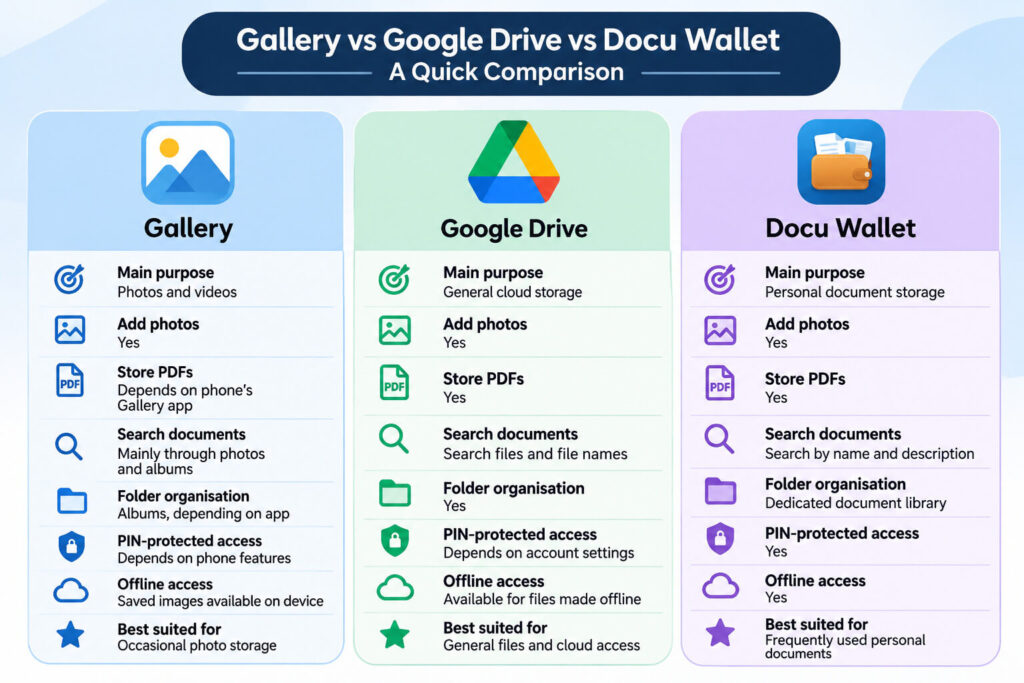
Gallery vs Google Drive vs Docu Wallet: A Quick Comparison
Which Option Is Best for Your Needs?
The right storage option depends on how often you access your documents and how easily you want to find them. You may need your Aadhaar or PAN card for job applications, KYC verification, travel, banking, or family requirements.
Gallery is useful for storing and viewing document photos, while Google Drive helps you organise PDFs and other files in folders. However, finding a specific document may take extra time if you have several files saved.
A dedicated digital document wallet like Docu Wallet makes it easier to manage frequently used personal documents. You can add files with clear names and descriptions, then search for them whenever needed. This is especially helpful when you manage multiple documents for yourself or your family.
You can also use Google Drive and Docu Wallet together. Keep your general files in Drive and use Docu Wallet to access personal IDs and important documents quickly.
How to Choose the Right Digital Documents App
Before choosing a digital documents app, think about what you need it to do.
Consider these questions:
- What types of files do you store? Check whether the app supports the images and PDFs you use.
- How do you find documents? Look for search options that match how you name and describe files.
- Do you need offline access? This matters when you travel or have limited internet access.
- How does the app handle access? Check whether it offers PIN-protected access and understand its storage approach.
- Does it support backups? Understand where your files are stored and how you can restore them if you change phones.
- How often do you share documents? Check whether you can share files through the apps you already use.
A good document organizer should fit your routine. It should make document access simpler rather than adding more steps.
Keep Your Important IDs Easy to Find With Docu Wallet
Your phone Gallery, Google Drive, and a dedicated documents app all have different uses. Gallery is convenient for images, Google Drive is useful for general cloud storage, and Docu Wallet focuses on personal document management.
If you regularly need to find Aadhaar, PAN, driving licence, bank cards, or other personal files, Docu Wallet gives you a dedicated place to keep them.
You can add documents from your camera, Gallery, or phone storage, give them names and descriptions, and search for them from the home screen. The app also supports PIN-protected access, offline viewing, PDF and image files, and sync with your own Google Drive.
Download Docu Wallet on Google Play and start keeping your important documents organised in one place.
Frequently asked questions
1. Is Docu Wallet a digital documents app?
Yes. Docu Wallet is an Android app for storing and managing personal documents. It supports images and PDFs, name and description search, PIN-protected access, offline use, and Google Drive sync.
2. Can I store Aadhaar and PAN cards in Docu Wallet?
Yes. You can add Aadhaar and PAN card images or PDF files using your camera, gallery, or phone storage. Give each document a name and description so you can find it later.
3. Does Docu Wallet work without the internet?
Yes. You can add, view, and search documents saved in Docu Wallet without an internet connection. Google Drive synchronisation takes place when you are online again.
4. Can I use Docu Wallet and Google Drive together?
Yes. Docu Wallet syncs your documents with your own Google Drive account. You can use Docu Wallet to manage and find personal documents while continuing to use Drive for other files.